FBDownload Guide: Save Facebook Videos Fast & Secure
Searching for a way to save Facebook videos in HD? While many downloaders exist, few can maintain the original high-definition quality. In this guide, I'll show you how to use FBDownload to capture every detail of your favorite Facebook content in stunning high quality.
FBDownload.to is a premium-grade tool enabling downloads in Full HD, 1080p, 2K, and even 4K with crystal-clear audio. Our service works directly in your web browser, eliminating the need for software installations. Whether you're on an iPhone, Android, or PC, we've got you covered.
More than just a video downloader, our platform supports Facebook Reels, private videos, and high-bitrate MP3 conversion. FBDownload is 100% free, ensuring you can grab music and videos anytime without subscription fees or complicated setups.
Step 1: Copy the Facebook video URL
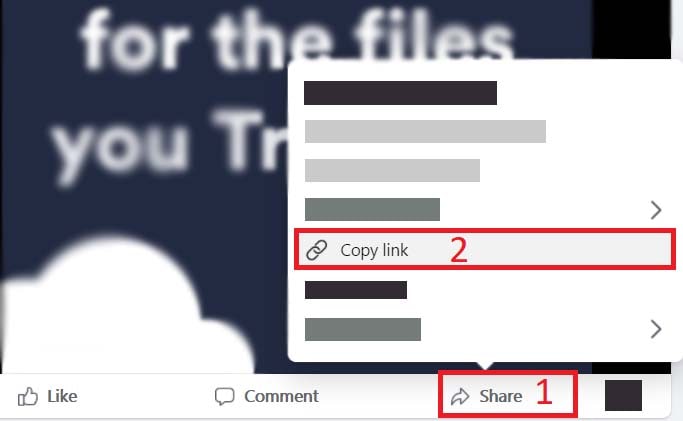
Open the Facebook app or site and find your video. Simply tap Share and select Copy Link to grab the video's URL instantly.
Step 2: Access FBDownload and fetch video details
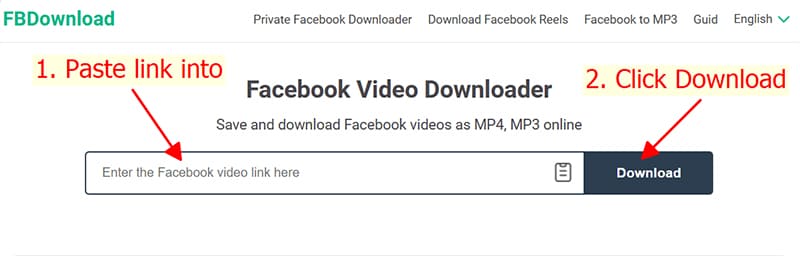
Go to https://fbdownload.to/en using any web browser. Paste the copied Facebook link into the input box at the top of our homepage.
Step 3: Choose quality and save video
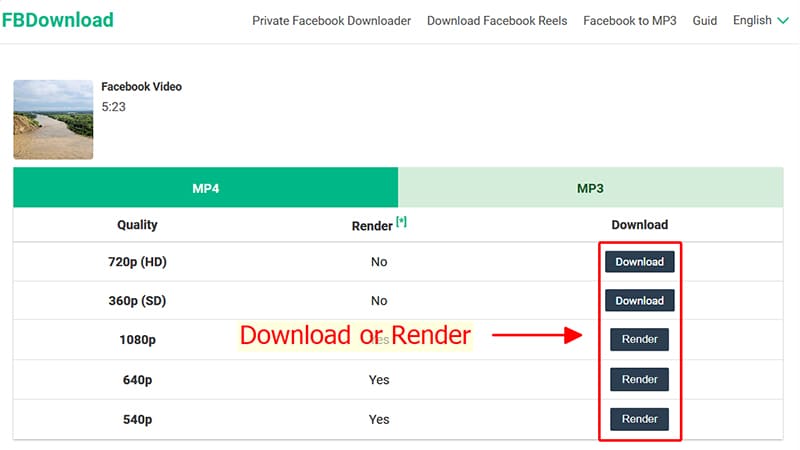
Select your preferred format (MP4/MP3) and resolution (SD, 1080p, 4K). Click Download or Render and wait a moment for the file to save to your device.
Note
- For high-quality videos such as HD, 1080P, 2K, or 4K, Facebook usually separates the video and audio streams. Therefore, the system needs extra time to process and merge the data before generating a complete download link.
- To save private Facebook videos or content from closed groups, please use our specialized Private Facebook Downloader for the most secure and efficient experience.
During use, if you encounter an error, please contact us for support: contact@fbdownload.to